Jeepz.com - The ultimate Jeep and offroad site.
Go Back   Jeepz.com > Technical Forums > Jeep Electronics and Audio
This section Sponsored By
Jeepz.com, the Ultimate Jeep and Offroad Message Board - Welcome Register today!
Reply
 
LinkBack Thread Tools Display Modes
  #1 (permalink)  
Old 05-19-2009, 04:19 PM
0okami.Digital's Avatar
Junior Member
 
Jeep :
Year :
TJ Wrangler
2003
    
Join Date: May 2009
Posts: 23
Send a message via MSN to 0okami.Digital
computer installation in the jeep... jeeputer / carputer (pics inside)

hey peoples. i'm new around here and I thought it would be ok to share a little something i did to my jeep...

Before:

And after...

figuring how much space im working with...


Back to the workbench to brainstorm... (it was a real mess back then)


Testing screen and hardware:


modifying the blackbox (staples security box) to store the vital hardware components:


going good....


the blackbox... almost finished...


And testing:


Now lets talk about whats in there...
- Asus motherboard / 945 intel onboard graphics
- Intel Pentium 2.5ghz dual core cpu (e5200)
- 140w DC/DC intelligent power supply
- 120GB Travelstar 2.5" SATA laptop hard drive - (hard drive has taken some serious abuse and still going!)
- 2gb ram
- usb wifi with jeeps antenna modified to be used for wifi antenna (not pictured)
- internet access via tethered iphone over 3g for when wifi is unavailable (not pictured) Great for streaming music or broadcasting the dash-cam. (also not shown)
- Brando (chinese made) mini wireless illuminated keyboard. I still want to vinyl dye keyboard case black...
- gps receiver (with iguidance software and custom audio files. )

Since I put a screen where the radio was, i had two options,
a) go without a headunit (headless) and use straight amps controlled by the line of the computer, or....
b) relocate the radio. I had a dead subwoofer anyway. So I decided to relocate the headunit.


Searching for the right piece of scrap metal...


Trimmed to fit:


fits fine...


More trimming... (that stuff stinks) ...Radio cage fitted.


and done.. now i just gotta slide the radio in and HOPE its not too loose. (it was nice and snug) One thing to note,

the sony receaver i added will not play cd's worth a damn... but who uses cd's anymore anyway. I just needed the line

in and volumen/channel distribution features.
__________________
~0okami.Digital

Last edited by 0okami.Digital; 05-19-2009 at 06:01 PM..
Reply With Quote
View Public Profile Send a private message to %1$s Show 0okami.Digital gallery
  #2 (permalink)  
Old 05-19-2009, 04:19 PM
0okami.Digital's Avatar
Junior Member
 
Jeep :
Year :
TJ Wrangler
2003
    
Join Date: May 2009
Posts: 23
Send a message via MSN to 0okami.Digital
Re: computer installation in the jeep... jeeputer / carputer

-----continued.----


Putting the VGA touch screen in...


Testing...


wiring some custom motherboard headers: LEDs, IEDs and emergency reset switch.


Modified usless plastic to be usefull. I actually wanted to add some usb ports there for memory sticks, but i changed

my mind when I could not find a spare part incase i ruined that panel. the motherboard headers connect to this via

Cat5 wire and rj45 jacks.


And here we have it!....

Inactive:


Active:


and the blackbox is hiding:
__________________
~0okami.Digital
Reply With Quote
View Public Profile Send a private message to %1$s Show 0okami.Digital gallery
  #3 (permalink)  
Old 05-19-2009, 04:23 PM
0okami.Digital's Avatar
Junior Member
 
Jeep :
Year :
TJ Wrangler
2003
    
Join Date: May 2009
Posts: 23
Send a message via MSN to 0okami.Digital
Re: computer installation in the jeep... jeeputer / carputer

oh almost forgot the obligatory jeep pic:


And some software interface shots:
Centrafuse is the front end you see with the aurora skin:

Front screen (has more than whats shown... various pages with different buttons)


Audio player (listening to ikimono gakari)


random fun non functional items (although spike deployment can be implemented)
__________________
~0okami.Digital

Last edited by 0okami.Digital; 05-19-2009 at 04:48 PM..
Reply With Quote
View Public Profile Send a private message to %1$s Show 0okami.Digital gallery
  #4 (permalink)  
Old 05-19-2009, 04:59 PM
Wrangl3r93's Avatar
Senior Member
 
    
Real Name: Matt League
Join Date: Nov 2005
Location: Murfreesboro, TN
Posts: 656
Send a message via AIM to Wrangl3r93
Re: computer installation in the jeep... jeeputer / carputer

This is awesome!!!
__________________
The poster formerly known as Red93...

'93YJ 4.0HO, 33x12.50r15 Maxxis Mudder Buckshots, 4.5 RE extreme-duty lift w/ 1" BL, 4.11 gears, Aussie locked front, 1in transfer case drop soon to be replaced by SYE/cv shaft, 2 memphis 10's pushed by a memphis pr500, custom bumpers made by me

http://www.myjeepspace.com/wrangl3r93

http://www.tnvjc.org/index.php
Reply With Quote
View Public Profile Send a private message to %1$s Show Wrangl3r93 gallery
  #5 (permalink)  
Old 05-19-2009, 05:04 PM
SteelHeadz's Avatar
Moderator
 
Jeep :
Year :
Lift :
Tires :
CJ7/ AMC 360
1981
4.5
35x14.5 15 Pittbull Krawlers
    
Real Name: Mikey
Join Date: Oct 2008
Location: Kerrville, TX
Posts: 3,999
Send a message via MSN to SteelHeadz Send a message via Yahoo to SteelHeadz
Re: computer installation in the jeep... jeeputer / carputer

I like it. Hey man, do you do mod's on the xbox 360 controllers?
__________________
Confucious says: I am not one who was born in the possession of knowledge; I am one who is fond of antiquity, and earnest in seeking it there.
Reply With Quote
View Public Profile Send a private message to %1$s Show SteelHeadz gallery
  #6 (permalink)  
Old 05-19-2009, 05:54 PM
0okami.Digital's Avatar
Junior Member
 
Jeep :
Year :
TJ Wrangler
2003
    
Join Date: May 2009
Posts: 23
Send a message via MSN to 0okami.Digital
Re: computer installation in the jeep... jeeputer / carputer

Quote:
Originally Posted by SteelHeadz View Post
I like it. Hey man, do you do mod's on the xbox 360 controllers?
naa... last controller mod i did was converting snes pads to work on LPT port. But nothing on the xbox controller yet. i have that usb wireless dongle to hook the controllers to the pc.... makes it pointless to mod the xbox controllers when set up is that easy.
__________________
~0okami.Digital
Reply With Quote
View Public Profile Send a private message to %1$s Show 0okami.Digital gallery
  #7 (permalink)  
Old 05-19-2009, 09:29 PM
TerryMason's Avatar
Administrator
 
Jeep :
Year :
Lift :
Tires :
TJ Wrangler
2005
2"
31"
    
Real Name: Terry Mason
Join Date: Dec 1999
Location: Virginia Beach VA
Posts: 2,925
Re: computer installation in the jeep... jeeputer / carputer

That's slick. I like the idea of having a computer with a frontend on it. It seems kind of future proof.

So, what monitor / lcd did you use? It looks like an lcd made for a 5.25 inch bay.
__________________

Looking for Jeep Parts? Check with the Jeepz.com vendors - they help us keep the lights on!
Reply With Quote
View Public Profile Send a private message to %1$s Show TerryMason gallery TerryMason TerryMason's Arcade Awards Gemstone Castle Meteor Mayhem Infectonator Duck Hunt Red Storm Last Bullet Days2Die - The Other Side One Too Many
  #8 (permalink)  
Old 05-19-2009, 09:55 PM
B'ham Jeeper's Avatar
Senior Member
 
Jeep :
Year :
Lift :
Tires :
JK Wrangler
2007
Stock
32"
    
Real Name: Susan
Join Date: Jul 2007
Location: Birmingham, AL
Posts: 498
Re: computer installation in the jeep... jeeputer / carputer

That is sweet! I really like the way you did that....beautiful dog too.
Reply With Quote
View Public Profile Send a private message to %1$s Show B'ham Jeeper gallery
  #9 (permalink)  
Old 05-19-2009, 10:24 PM
0okami.Digital's Avatar
Junior Member
 
Jeep :
Year :
TJ Wrangler
2003
    
Join Date: May 2009
Posts: 23
Send a message via MSN to 0okami.Digital
Re: computer installation in the jeep... jeeputer / carputer

Quote:
Originally Posted by TerryMason View Post
That's slick. I like the idea of having a computer with a frontend on it. It seems kind of future proof.

So, what monitor / lcd did you use? It looks like an lcd made for a 5.25 inch bay.
its actually an automotive designed screen. MTSVO-SC K301 (hard to find anymore)


A lot of people are keeping an eye on a company called zenarc for screens in development but their last batch was quite a disappointment with issues running from lockups to damaged eject gears. Its going to be awesome once they get it right though.

Xenarc Technologies - MDT-X7000 - 7" IN-DASH Touchscreen LCD VGA Monitor


the dvd/cd can actually function for data as well.

(seems they have them up for order again at 799.00ea) ouch.
__________________
~0okami.Digital
Reply With Quote
View Public Profile Send a private message to %1$s Show 0okami.Digital gallery
  #10 (permalink)  
Old 05-27-2009, 06:11 AM
88Wrangles's Avatar
Senior Member
 
Jeep :
Year :
Lift :
Tires :
YJ Wrangler
1988
6"
42"
    
Join Date: Nov 2003
Location: Lacey, Washington
Posts: 2,782
Send a message via AIM to 88Wrangles
Re: computer installation in the jeep... jeeputer / carputer

I hate you people that make all that computer stuff look so easy!!!!! Haha! just kidding....well sort of!

Looks like it turned out real good! Very clean setup for sure
Reply With Quote
View Public Profile Send a private message to %1$s Show 88Wrangles gallery
  #11 (permalink)  
Old 06-10-2009, 05:48 PM
Junior Member
 
    
Real Name: Craig Miller
Join Date: Jun 2009
Location: Mount Vernon, WA
Posts: 12
Re: computer installation in the jeep... jeeputer / carputer

Nice install. Very clean.

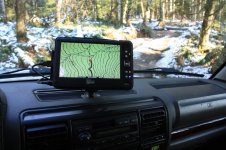
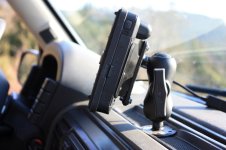
I've run a carputer in my truck in the past and am running a semi-ruggedized UMPC with a sunlight visible screen now. The UMPC is as easy to install as a regular GPS (Ram mount, bracket, 12v DC power, and UMPC). I like having the extra functionality and mostly the larger screen for reading maps.

Because nothing else existed, I decided to make a touchscreen friendly topo mapping package that I'm now selling. This is my first post, but if anyone is interested, and it's OK with the admins I'll post a link.

Craig
Attached Thumbnails
computer installation in the jeep... jeeputer / carputer-img_3365.jpg   computer installation in the jeep... jeeputer / carputer-img_3387.jpg  

Reply With Quote
View Public Profile Send a private message to %1$s Show spatialminds gallery spatialminds
  #12 (permalink)  
Old 06-18-2009, 07:56 PM
Junior Member
 
    
Real Name: Craig Miller
Join Date: Jun 2009
Location: Mount Vernon, WA
Posts: 12
Re: computer installation in the jeep... jeeputer / carputer

I sent a message to the Admin but haven't heard back. We're sponsoring the site now, and I'm pretty sure it is of interest to anyone reading this thread... so, here's the blurb, a link to the video, and a couple of photos.

Overland Navigator turns any Windows netbook, laptop, tablet, or UMPC and a cheap GPS puck into an easy to use offroad mapping system. Rather than create tracks/waypoints and download them to your handheld GPS, Overland Navigator is designed to be used in the field as the GPS.

* USGS topographic maps are rich in detail. More than just roads.
* Maps are seamless and automatic
* Record GPS tracks and waypoints
* Ideal for netbooks and UMPCs - Uses the entire screen
* Touchscreen, mouse, and keyboard compatible


See the "Testimonials" section of our website for example installations (still need to add the Jeep examples).

Screenshots


Reply With Quote
View Public Profile Send a private message to %1$s Show spatialminds gallery spatialminds
  #13 (permalink)  
Old 06-18-2009, 08:18 PM
Sine Deviance's Avatar
Senior Member
 
Jeep :
Year :
Lift :
Tires :
YJ Rio Grande Edition
1995
2" Black Diamond
31" BFG A/T's
    
Real Name: Jared K.
Join Date: May 2009
Location: Lake Norman, NC
Posts: 226
Re: computer installation in the jeep... jeeputer / carputer

Awesome build, using the cat5 cable as a shuttle for the switches is an ingenious idea and I've never seen that done before.

When you built your Jeeputer did you use a micro-ATX mainboard or a nano-ATX? Also, I noticed you've only got one case fan in that system, is that sufficient cooling to run the computer continuously in ~80F heat with no A/C? And finally, which PSU did you use? It'd have to be small, yet capable, and have a good fan to run that and I can't find a good one

Oh, and I almost forgot, did you just hardwire up a DC-AC inverter for the PSU to feed from and if so how did it work out for you? I was thinking of hardwiring a DC-AC inverter, but on a switch, so I could turn it off when I wanted, because PSU's still draw small amounts of power when the computer is off for things like keeping the BIOS clock and I'd like to avoid that.

Thanks!
__________________
'95 Wrangler Rio Grande - 2.5L 5-speed - 2" Black Diamond Lift - Carr Rota Lightbar - 4x PIAA Daylighters - Cragar 397 Series Soft 8's - 31" BFG A/T's - 4.0L Throttle Body - 3" Custom Intake w/ Speed by Spectre Conical Filter
Reply With Quote
View Public Profile Send a private message to %1$s Show Sine Deviance gallery Sine Deviance
  #14 (permalink)  
Old 06-19-2009, 12:35 AM
0okami.Digital's Avatar
Junior Member
 
Jeep :
Year :
TJ Wrangler
2003
    
Join Date: May 2009
Posts: 23
Send a message via MSN to 0okami.Digital
Re: computer installation in the jeep... jeeputer / carputer

Quote:
Originally Posted by Sine Deviance View Post
Awesome build, using the cat5 cable as a shuttle for the switches is an ingenious idea and I've never seen that done before.

When you built your Jeeputer did you use a micro-ATX mainboard or a nano-ATX? Also, I noticed you've only got one case fan in that system, is that sufficient cooling to run the computer continuously in ~80F heat with no A/C? And finally, which PSU did you use? It'd have to be small, yet capable, and have a good fan to run that and I can't find a good one

Oh, and I almost forgot, did you just hardwire up a DC-AC inverter for the PSU to feed from and if so how did it work out for you? I was thinking of hardwiring a DC-AC inverter, but on a switch, so I could turn it off when I wanted, because PSU's still draw small amounts of power when the computer is off for things like keeping the BIOS clock and I'd like to avoid that.

Thanks!
M-ATX board. Specificly the Gigabyte 645gcm (i know i know.... i said earlier it was an asus... That was in my older project which is done and sold.)
CPU is an Intel core 2 duo e7200 Wolfdale (waaauuUUU!!!!!! /ends howl) clocked at 2.53GHz


Only 1 case fan does wonders actually. I was going to go with two, but i saw no need for it. the fan pulls in air, and the warm air rushes out of where the cables hook in. There is a LOT of air flow passing since it does not have the metal plate on the back.


I have not had any issues with over heating and the system runs cool.

(motherboard and CPU temps numbers appear to be switched around (bios bug?))

As for the power supply its an M4ATX:

Review here: Review: M4-ATX 250 Watt Intelligent Power Supply - MP3Car.com
I have absolutely NO complaints about this PSU. NONE. Its perfect as far as i'm concerned. If you do plan on buying a psu STAY AWAY from OPUS PSU's. I had one and it worked when it wanted to and sometimes never shut down. This m4atx is nice. and it has a usb software interface to it too (which i have not had to use yet)

The psu is an automotive DC-DC power supply. Comptuers operate on DC-12v so there is no need for those bulky DC/AC converters boxes. You just need something stable and clean like the m4ATX PSU. It wires up just like an amp. +12v, Grnd, +12 remote/sensor switch on.

And its small as you can see:


You can also wire it up to a switch but why do so if you can just wire up the remote wire to an accessory and just power it on from the ignition key acc/on? but, thats up to you. I do know you WILL want a reset switch incase it locks up. I learned this when mine locked up and i was on the highway (bad wifi driver at te time.) Only way to reboot was to a)pull over and shut down the car... or b) shut the car off, coast and turn it back on 30 sec later. (its nice having a manual vehicle! :P ) Lesson learned. Reset switch is vital.

Hmm.. any other questions?
__________________
~0okami.Digital

Last edited by 0okami.Digital; 06-19-2009 at 12:48 AM..
Reply With Quote
View Public Profile Send a private message to %1$s Show 0okami.Digital gallery
  #15 (permalink)  
Old 06-19-2009, 08:41 AM
TerryMason's Avatar
Administrator
 
Jeep :
Year :
Lift :
Tires :
TJ Wrangler
2005
2"
31"
    
Real Name: Terry Mason
Join Date: Dec 1999
Location: Virginia Beach VA
Posts: 2,925
Re: computer installation in the jeep... jeeputer / carputer

I have been thinking about getting a scangauge, or similar device - it plugs into the odb II port, and can do things like - show me my correct speed (it can compensate for larger tires), and give me my current fuel milage. Can you do things like that with yours?

The more I think about this, the better it sounds
__________________

Looking for Jeep Parts? Check with the Jeepz.com vendors - they help us keep the lights on!
Reply With Quote
View Public Profile Send a private message to %1$s Show TerryMason gallery TerryMason TerryMason's Arcade Awards Gemstone Castle Meteor Mayhem Infectonator Duck Hunt Red Storm Last Bullet Days2Die - The Other Side One Too Many
  #16 (permalink)  
Old 06-20-2009, 01:00 AM
0okami.Digital's Avatar
Junior Member
 
Jeep :
Year :
TJ Wrangler
2003
    
Join Date: May 2009
Posts: 23
Send a message via MSN to 0okami.Digital
Re: computer installation in the jeep... jeeputer / carputer

Quote:
Originally Posted by TerryMason View Post
I have been thinking about getting a scangauge, or similar device - it plugs into the odb II port, and can do things like - show me my correct speed (it can compensate for larger tires), and give me my current fuel milage. Can you do things like that with yours?

The more I think about this, the better it sounds
for obdII hardware i use the serial OBDpros scan device: OBDPros

And for software i use EasyObdII Version 2.2.0: EasyObdII - ScanTool.net OBD-II Elmscan Interface Software - EasyObdII Version 2.2.0 (Powered by CubeCart)


(screen shots are not from my vehicle) but its the same software i use for OBDII


Its very functional for what I need. I leave it plugged in all the time.
__________________
~0okami.Digital
Reply With Quote
View Public Profile Send a private message to %1$s Show 0okami.Digital gallery
  #17 (permalink)  
Old 06-20-2009, 11:20 PM
SteelHeadz's Avatar
Moderator
 
Jeep :
Year :
Lift :
Tires :
CJ7/ AMC 360
1981
4.5
35x14.5 15 Pittbull Krawlers
    
Real Name: Mikey
Join Date: Oct 2008
Location: Kerrville, TX
Posts: 3,999
Send a message via MSN to SteelHeadz Send a message via Yahoo to SteelHeadz
Re: computer installation in the jeep... jeeputer / carputer

Is that capable of CAN B(controller area network) and CAN C communications on the newer Jeeps?
__________________
Confucious says: I am not one who was born in the possession of knowledge; I am one who is fond of antiquity, and earnest in seeking it there.
Reply With Quote
View Public Profile Send a private message to %1$s Show SteelHeadz gallery
  #18 (permalink)  
Old 06-20-2009, 11:49 PM
Junior Member
 
Jeep :
Year :
Lift :
Tires :
Cherokee
1998
3"
31"
    
Real Name: Shawn
Join Date: May 2009
Location: Newberg, Oregon
Posts: 7
Re: computer installation in the jeep... jeeputer / carputer

DO you have to shut it down everytime you stop driving or is it set up like a laptop with hibernate?
Reply With Quote
View Public Profile Send a private message to %1$s Show Bullet gallery
  #19 (permalink)  
Old 06-21-2009, 10:48 PM
Sine Deviance's Avatar
Senior Member
 
Jeep :
Year :
Lift :
Tires :
YJ Rio Grande Edition
1995
2" Black Diamond
31" BFG A/T's
    
Real Name: Jared K.
Join Date: May 2009
Location: Lake Norman, NC
Posts: 226
Re: computer installation in the jeep... jeeputer / carputer

One more... what GPS receiver did you use? I want to get Overland Navigator going so I'd like to use the GPS you used since it's apparently compatible.

Thanks for answering my questions. After checking out Mini-box I am thinking I'll just go with one of their Atom systems. I can get a full working dual-CPU Intel Atom system ready to have windows loaded on it WITH a 7" touchscreen + mounting brackets, wiring, everything else for ~$550. I can't even build it myself that cheap.
__________________
'95 Wrangler Rio Grande - 2.5L 5-speed - 2" Black Diamond Lift - Carr Rota Lightbar - 4x PIAA Daylighters - Cragar 397 Series Soft 8's - 31" BFG A/T's - 4.0L Throttle Body - 3" Custom Intake w/ Speed by Spectre Conical Filter

Last edited by Sine Deviance; 06-21-2009 at 11:18 PM..
Reply With Quote
View Public Profile Send a private message to %1$s Show Sine Deviance gallery Sine Deviance
  #20 (permalink)  
Old 06-21-2009, 11:06 PM
TJ_Jeep's Avatar
Senior Member
 
Jeep :
Year :
Lift :
Tires :
TJ Sport
1998
5"
35" Nitto Terra Grappler
    
Real Name: Chayse
Join Date: Nov 2008
Location: A little place in the wettest dry county in Alabama
Posts: 378
Send a message via AIM to TJ_Jeep Send a message via Skype™ to TJ_Jeep
Re: computer installation in the jeep... jeeputer / carputer

I like the way that his jeep is all nice and clean on the inside.... and shiny..... i can't ever get mine to do that lol
__________________
My Jeep has a 5th gear??
Reply With Quote
View Public Profile Send a private message to %1$s Show TJ_Jeep gallery
Reply


Thread Tools
Display Modes

Posting Rules
You may not post new threads
You may not post replies
You may not post attachments
You may not edit your posts

BB code is On
Smilies are On
[IMG] code is On
HTML code is Off
Trackbacks are On
Pingbacks are On
Refbacks are On


Similar Threads
Thread Thread Starter Forum Replies Last Post
2.5 installation.... mainmansam CJ YJ TJ and JK 2 08-23-2008 11:32 AM
2005 + Jeep, Chrysler, and Dodge computer codes TerryMason Reference 5 12-17-2007 05:13 PM
93 Jeep yj computer from automatic harrylanie Items for Sale, Trade, or Give Away 0 02-18-2007 02:59 PM
Computer not Jeep problem Tug-n-pull General Chat 15 02-24-2004 02:27 PM
1990 Jeep Cherokee Fuel Pump Installation jeepxj3inch Cherokee, Commander, Wagoneer and Liberty 1 07-20-2003 08:00 PM


All times are GMT -5. The time now is 07:32 AM.


 Subscribe to our RSS feed